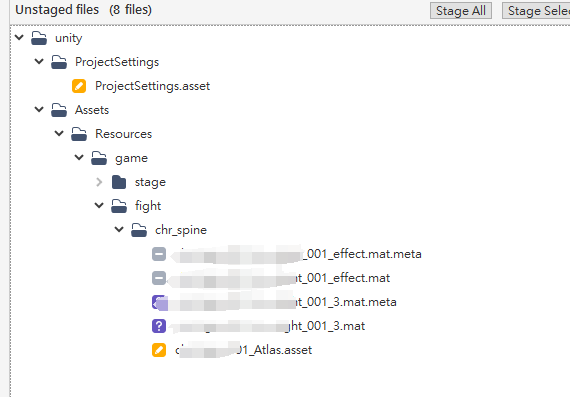
spine重新生成atlas referece,造成資源異動
項目成員git更新后總是會出現變動,不管刪掉還是怎樣還是會再出現,試過了刪除 Library 還是一樣
urscos Tech.
項目成員git更新后總是會出現變動,不管刪掉還是怎樣還是會再出現,試過了刪除 Library 還是一樣
最近在研究如何有效的製作動畫表現, 找了下想起了之前適用的 xNode, 也順帶找到官方支援的 visual script 索性就試試看
這個是用程式方式實現的功能, 功能要就是設定物件位置、生成效果 prefab、顯示傷害數字、刪除生成資源,并不複雜

項目中使用到多組 camera, 造成戰鬥表現上面被 ui 給覆蓋, 起因是因為項目使用了 ugui 並且 Can vas 設定 Render Mode 為 Screen Space - Overlay

最近為了處理 Google Play 升級問題, 遇到了奇怪的情況, 記錄下來, GP 要求 app 需要升級 android 版本跟支付庫版本
應用程式必須指定 Android 14 (API 級別 34) 以上版本
應用程式必須使用 Google Play 帳款服務程式庫 6.0.1 以上版本
升級上沒多想就把 unity 的版本選擇了

What went wrong:
Execution failed for task ':launcher:processDebugResources'.
A failure occurred while executing com.android.build.gradle.internal.tasks.Workers$ActionFacade
AAPT2 aapt2-4.0.1-6197926-windows Daemon #0: Unexpected error during link, attempting to stop daemon.
This should not happen under normal circumstances, please file an issue if it does.
What went wrong:
Execution failed for task ':unityLibrary:processDebugAndroidTestResources'.
A failure occurred while executing com.android.build.gradle.internal.tasks.Workers$ActionFacade
AAPT2 aapt2-4.0.1-6197926-windows Daemon #1: Unexpected error during link, attempting to stop daemon.
This should not happen under normal circumstances, please file an issue if it does.
對比了空項目確認不是 FB 跟 GooglePlayGames 庫問題, 比對兩個 AS 項目後來發現 compileSdkVersion 使用 34 就是會出錯, 後來把 compileSDKVersion 改 33 就好了
compileSdkVersion 33
在 AS 連機執行 Play 出現錯誤
INSTALL_PARSE_FAILED_MANIFEST_MALFORMED
可能是 manifest 問題, 但 AS 沒提示哪邊有錯誤, 索性打包 aab 丟到 Google play 看看
上船完成後提示
您上傳的 APK 或 Android App Bundle 內含活動、活動別名、服務或廣播接收器,這些項目含有意圖篩選器,但沒有「android:exported」設定屬性。您無法在 Android 12 以上版本上安裝這個檔案。詳情請參閱:developer.android.com/about/versions/12/behavior-changes-12#exported
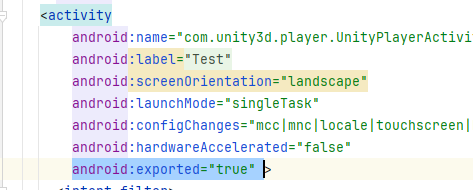
AndroidManifest.xml 缺少 export 屬性, 加入屬性到 <activity 底下就可以
android:exported="true"