CodeGraph 安裝與使用教學:整合 Claude Code、Cursor、Codex 的程式碼圖譜工具
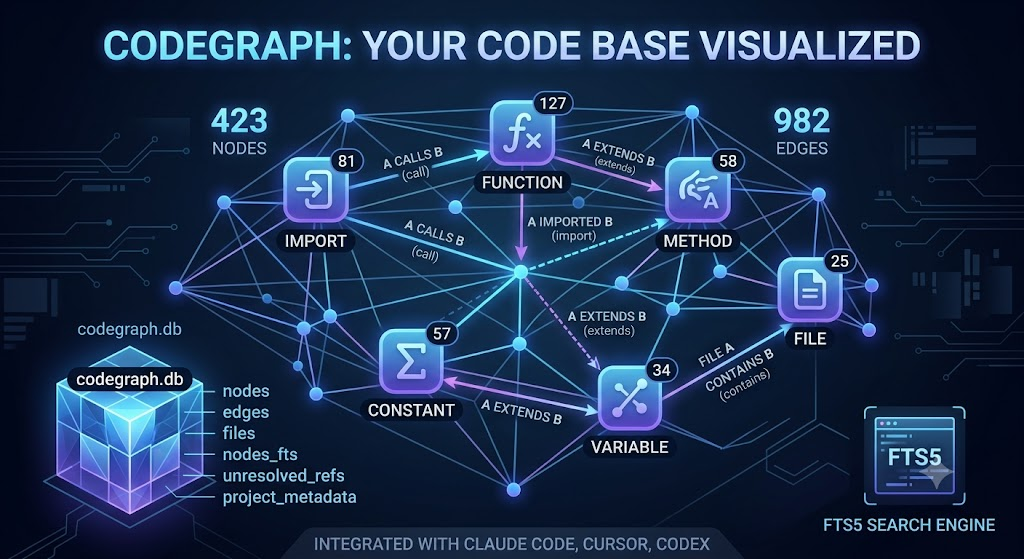
在大型程式項目中通常會透過不同手段來優化 llm token 的使用效益,本篇文章將介紹如何使用 codegraph
安裝 CLI
npm install -g @colbymchenry/codegraph
進入到項目中,安裝 codegraph,它會自動偵測並設定 Claude Code、Cursor、Codex
$ codegraph install
選擇對應 AI 模型
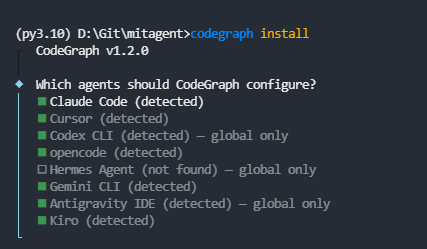
其餘選擇如下:
◇  Which agents should CodeGraph configure?
│  Claude Code (detected), Cursor (detected), Codex CLI (detected) — global only, opencode (detected), Gemini CLI (detected), Antigravity IDE (detected) — global only, Kiro (detected)
│
◇  Install the codegraph CLI on your PATH? (Required so agents can launch the MCP server)
│  Yes
│
◇  Installed codegraph CLI on PATH
│
◇  Apply agent configs to all your projects, or just this one?
│  Just this project
│
◇  Auto-allow CodeGraph commands? (Skips permission prompts in Claude Code)
│  Yes
│
◇  Share anonymous usage stats? (No code, paths, or names — see TELEMETRY.md)
│  Yes
│
●  Thanks! Exactly what is collected: https://github.com/colbymchenry/codegraph/blob/main/TELEMETRY.md
│
◇  Front-load CodeGraph on “how / where / trace” prompts? Auto-injects structural context so answers need fewer steps (adds a moment to those prompts; Claude Code only).
│  Yes
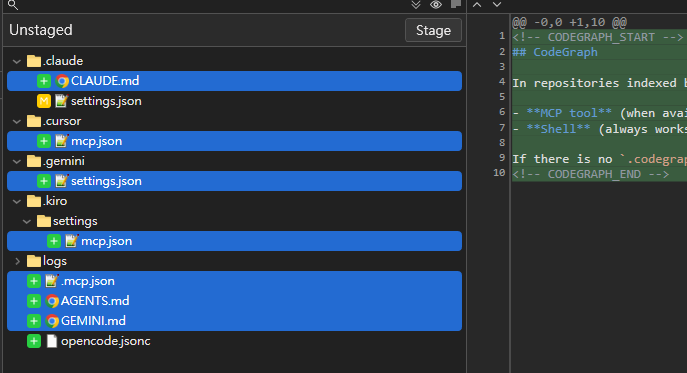
生成了這些檔案
建立程式碼索引
(py3.10) D:\Git\mitagent>codegraph init
┌  Initializing CodeGraph
│
◆  Initialized in D:\Git\mitagent
|
|  * Scanning files - 25 found
|  * Parsing code - done
|  * Resolving refs - done
│
◆  Indexed 25 files
│
●  423 nodes, 982 edges in 721ms
│
└  Done
查看目前 codegraph 狀態
(py3.10) D:\Git\mitagent>codegraph status

CodeGraph Status

Project: D:\Git\mitagent

Index Statistics:
  Files:     25
  Nodes:     423
  Edges:     982
  DB Size:   1.26 MB
  Backend:   node:sqlite - built-in (full WAL)
  Journal:   wal

Nodes by Kind:
  function        127
  import          81
  method          58
  constant        57
  variable        34
  file            25
  class           23
  interface       9
  route           9

Files by Language:
  python          12
  javascript      11
  tsx             2

[OK] Index is up to date
安裝完成後,AI Agent 會自動透過 MCP 查詢圖譜
| 指令 | 用途 |
|---|---|
codegraph status |
查看索引狀態 |
codegraph sync |
手動同步(通常不需要) |
codegraph uninit |
移除專案索引 |
codegraph uninstall |
從所有 Agent 移除設定 |
查某個函式的所有關係(呼叫者、被呼叫者)
(py3.10) D:\Git\mitagent>codegraph explore "ZOOM_SENSITIVITY"
**Exploration: ZOOM_SENSITIVITY**

Found 30 symbols across 2 files.

**Blast radius — what depends on these (update/verify before editing)**

- `ZOOM_SENSITIVITY` (screenshot/ref_GalaxyMap.tsx:84) — 2 callers in `screenshot/ref_GalaxyMap.tsx`; ⚠️ no covering tests found
- `ZOOM_SENSITIVITY` (static/js/constants.js:13) — 1 caller in `static/js/interaction.js`; ⚠️ no covering tests found
- `ZOOM_EASE_FACTOR` (screenshot/ref_GalaxyMap.tsx:86) — 2 callers in `screenshot/ref_GalaxyMap.tsx`; ⚠️ no covering tests found
- `MAX_ZOOM` (screenshot/ref_GalaxyMap.tsx:83) — 3 callers in `screenshot/ref_GalaxyMap.tsx`; ⚠️ no covering tests found

**Source Code**

> The code below is the **verbatim, current on-disk source** of these files — re-read from disk on this call and line-numbered, byte-for-byte identical to what the Read tool returns. It is NOT a summary, outline, or stale cache. Treat each block as a Read you have already performed: do not Read a file shown here.

**`screenshot/ref_GalaxyMap.tsx`** — MIN_ZOOM(constant), MAX_ZOOM(constant), ZOOM_SENSITIVITY(constant), ZOOM_EASE_FACTOR(constant), DEFAULT_ZOOM(constant)

tsx
      const NODE_RADIUS = 6
      const DEFAULT_COLOR = '#5a6a7a'
      const LINE_COLOR = 'rgba(140, 170, 200, 0.6)'
      const MIN_ZOOM = 0.001
      const MAX_ZOOM = 50
      const ZOOM_SENSITIVITY = 0.002
      const STAR_COUNT = 800
      const ZOOM_EASE_FACTOR = 0.15
      const PAN_EASE_FACTOR = 0.12


**`static/js/constants.js`** — ZOOM_SENSITIVITY(constant), ZOOM_EASE_FACTOR(constant), MAX_ZOOM(constant)

javascript
      /* === MitAgent — Constants & Configuration === */

      // --- Canvas ---
      export const BG_COLOR = '#050810';
      export const NODE_RADIUS = 8;
      export const NODE_RADIUS_HOVER = 11;
      export const LABEL_ZOOM_THRESHOLD = 0.3;

      // --- Camera ---
      export const MIN_ZOOM = 0.15;
      export const MAX_ZOOM = 5.0;
      export const DEFAULT_ZOOM = 0.8;
      export const ZOOM_SENSITIVITY = 0.001;
      export const ZOOM_EASE_FACTOR = 0.15;
      export const PAN_EASE_FACTOR = 0.12;


      // --- Polling ---
      export const POLL_INTERVAL = 2000; // ms

> Some file sections were trimmed for size. For a specific symbol you still need, run another `codegraph_explore` (or `codegraph_node`) with its exact name — line-numbered source, cheaper and more complete than Read.
查某個檔案的依賴
(py3.10) D:\Git\mitagent>codegraph node static\js\api.js
**static/js/api.js** — 73 lines, 6 symbols · used by 1 file: static/js/app.js

      /* === MitAgent — API Fetch Wrappers === */

      const API_BASE = '';  // Same origin — FastAPI serves both API and static

      /**
       * Fetch the full graph topology (all nodes + edges, no proof content).
       * Used once at startup for stable layout computation.
       */
      export async function fetchTopology() {
        const res = await fetch(`${API_BASE}/graph/topology`);
        if (!res.ok) throw new Error(`Topology fetch failed: ${res.status}`);
        return res.json();
      }

      /**
       * Create a new game session.
       * @param {number} maxTurns - Turn budget (default 20)
       * @returns {{session_id: string, observation: object}}
       */
      export async function newGame(maxTurns = 20) {
        const res = await fetch(`${API_BASE}/game/new?max_turns=${maxTurns}`, {
          method: 'POST',
        });
        if (!res.ok) throw new Error(`New game failed: ${res.status}`);
        return res.json();
      }

      /**
       * Get current world observation for a session.
       * @param {string} sessionId
       * @returns {ObserveResponse}
       */
      export async function observe(sessionId) {
        const res = await fetch(`${API_BASE}/game/${sessionId}/observe`);
        if (!res.ok) throw new Error(`Observe failed: ${res.status}`);
        return res.json();
      }

      /**
       * Submit an action (prove / connect / move).
       * @param {string} sessionId
       * @param {string} actionType - 'prove' | 'connect' | 'move'
       * @param {string|null} theoremId
       * @param {string|null} reasoning
       * @param {string|null} targetId
       * @returns {ActionResponse}
       */
      export async function submitAction(sessionId, actionType, theoremId = null, reasoning = null, targetId = null) {
        const body = { action_type: actionType };
        if (theoremId) body.theorem_id = theoremId;
        if (reasoning) body.reasoning = reasoning;
        if (targetId) body.target_id = targetId;

        const res = await fetch(`${API_BASE}/game/${sessionId}/action`, {
          method: 'POST',
          headers: { 'Content-Type': 'application/json' },
          body: JSON.stringify(body),
        });
        if (!res.ok) throw new Error(`Action failed: ${res.status}`);
        return res.json();
      }

      /**
       * Get score breakdown for a session.
       * @param {string} sessionId
       * @returns {ScoreResponse}
       */
      export async function fetchScore(sessionId) {
        const res = await fetch(`${API_BASE}/game/${sessionId}/score`);
        if (!res.ok) throw new Error(`Score fetch failed: ${res.status}`);
        return res.json();
      }