Unity CLI 串接 Claude Code:unity-editor-mcp 安裝、142 個工具與 subagent 消化大型場景
執行安裝 unity-editor-mcp
unity mcp configure claude-code
安裝結果:
Running: claude mcp add --scope user --transport stdio unity-editor-mcp unity mcp
Added stdio MCP server unity-editor-mcp with command: unity mcp to user config
File modified: C:\Users\joker****\.claude.json
進入 claude code 查看 mcp,這個 unity-editor-mcp 就是了
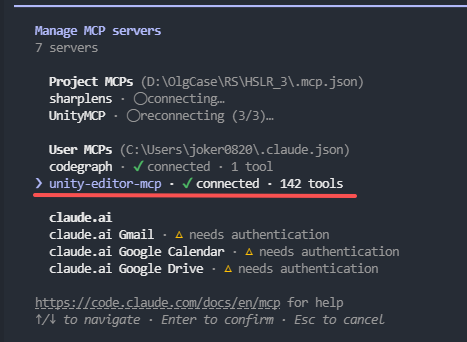
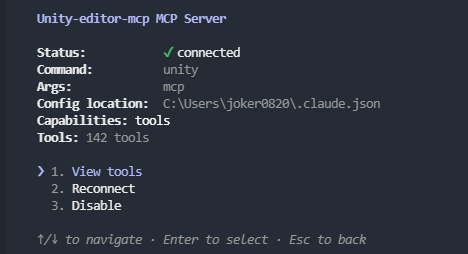
可以看到有 142 的工具可用
詢問:請查看目前 Unity Scene 裡有哪些 GameObject,不要修改任何東西。
● unity-editor-mcp - list_open_scenes (MCP)
{
  "count": 1,
  "scenes": [
    {
      "name": "Entry",
      "path": "Assets/Scenes/Entry.unity",
      "isLoaded": true,
      "isDirty": false,
      "isActive": true,
      "rootCount": 12
    }
  ]
}

● unity-editor-mcp - get_scene_hierarchy (MCP)
Error: result (164,703 characters across 3,574 lines) exceeds maximum allowed tokens. Output has been saved to C:\Users\joker****\.claude\projects\D--OlgCase-RS-****-3\4ca706be-cb35-469f-ba65-9e1031c2f291\tool-results\mcp-unity-editor-mcp-get_scene_hierarchy-1788338547743.txt.
Format: Plain text
- For targeted searches (find a line, locate a string): use grep on the file directly.
- For analysis or summarization that requires reading the full content: read C:\Users\joker****\.claude\projects\D--OlgCase-RS-****-3\4ca706be-cb35-469f-ba65-9e1031c2f291\tool-results\mcp-unity-editor-mcp-get_scene_hierarchy-1788338547743.txt in chunks of ~414 lines using offset/limit until you have read 100% of it.
- If the Agent tool is available, do this inside a subagent so the full output stays out of your main context. Give it the instruction above verbatim, and be explicit about what it must return — e.g. "Read C:\Users\joker****\.claude\projects\D--OlgCase-RS-****-3\4ca706be-cb35-469f-ba65-9e1031c2f291\tool-results\mcp-unity-editor-mcp-get_scene_hierarchy-1788338547743.txt in chunks of ~414 lines using offset/limit until you have read all 3,574 lines, then summarize and quote any key findings verbatim." A vague "summarize this" may lose detail.


場景很大(12 個根物件、3574 行階層),我讓子代理 全部塞進主脈絡。

● Explore(Summarize Unity scene hierarchy)
Backgrounded agent (↓ to manage · ctrl+o to expand)

目前狀態:Unity 只開了一個場景 Entry(Assets/Scenes/Entry.unity,isActive、未修改、12 個根物件)。

階層有 3574 行,我已派子代理讀完整檔並整理結構(純讀取、不改任何東西),完成後我會把場景裡的 GameObject 清單回報給你。

✻ Waiting for 1 background agent to finish

● Agent "Summarize Unity scene hierarchy" finished · 1m 4s

子代理已讀完整個階層。以下是目前 Unity 場景的 GameObject 清單(純檢視,未修改任何東西)。

場景:Entry(Assets/Scenes/Entry.unity)

唯一開啟的場景,isActive、未修改,共 12 個根物件。

┌─────┬─────────────────────┬────────┬────────────┬──────────────────────────────────────────────────────┐
│  #  │       根物件        │  啟用  │ 直接子物  角色                       │
├─────┼─────────────────────┼────────┼────────────┼──────────────────────────────────────────────────────┤
│ 1   │ UIPostProcessCamera │ ✔      │ 0                                    │
├─────┼─────────────────────┼────────┼────────────┼──────────────────────────────────────────────────────┤
│ 2   │ UICamera            │ ✔      │ 1        I 相機)                    │
├─────┼─────────────────────┼────────┼────────────┼──────────────────────────────────────────────────────┤
│ 3   │ BaseCamera          │ ✔      │ 0                                    │
├─────┼─────────────────────┼────────┼────────────┼──────────────────────────────────────────────────────┤
│ 4   │ ****Entry           │ ✔      │ 0                                    │
├─────┼─────────────────────┼────────┼────────────┼──────────────────────────────────────────────────────┤
│ 5   │ EventSystem         │ ✔      │ 0        nputModule                  │
├─────┼─────────────────────┼────────┼────────────┼──────────────────────────────────────────────────────┤
│ 6   │ SceneCanvas         │ ✔      │ 2         + CinemachineImpulseSource │
├─────┼─────────────────────┼────────┼────────────┼──────────────────────────────────────────────────────┤
│ 7   │ CinemachineCamera   │ ✔      │ 1                                    │
├─────┼─────────────────────┼────────┼────────────┼──────────────────────────────────────────────────────┤
│ 8   │ LogViewer           │ ✘ 停用 │ 1                                    │
├─────┼─────────────────────┼────────┼────────────┼──────────────────────────────────────────────────────┤
│ 9   │ QuantumConsole      │ ✔      │ 1                                    │
├─────┼─────────────────────┼────────┼────────────┼──────────────────────────────────────────────────────┤
│ 10  │ UIMouseCursor       │ ✔      │ 1        phic + 粒子)               │
├─────┼─────────────────────┼────────┼────────────┼──────────────────────────────────────────────────────┤
│ 11  │ FontManager         │ ✔      │ 0                                    │
├─────┼─────────────────────┼────────┼────────────┼──────────────────────────────────────────────────────┤
│ 12  │ Steam               │ ✔      │ 0                                    │
└─────┴─────────────────────┴────────┴────────────┴──────────────────────────────────────────────────────┘

幾個值得注意的點

- 相機共 4 台:UIPostProcessCamera、UICamera、BaseCamera,加上停用子樹裡的 SceneCanvas/stage51/Camera;另有 CinemachineCamera 虛擬相機。
- 兩個 AudioListener:一個在 UICamera,另一個在已停用的 stage51/Camera 內。
- 兩棵大子樹目前停用:
  - LogViewer(整棵)— 除錯 UI。
  - SceneCanvas/stage51(關卡 51 美術:Spine 骨  粒子 scene_fx、障礙物 obs_art)— 整棵關閉。
- 啟用中的 UI/演出:SceneCanvas/Root 下有 levelpanel、node_chunk(ChunkGen2)、node_obj;QuantumConsole 與 UIMouseCursor
  帶自己的 Canvas。
- 管理器類:****Entry、FontManager、Steam。
- 沒有任何 Light 物件,也沒有獨立 AudioSource(  光)。

這是「Entry」進入點場景 —— 主要是相機組、進入點/輸入與除錯工具,實際關卡內容(stage51)預設停用、執行時才載入。需要我展開哪個物件的完整子樹,或看某個物件掛了哪些元件/參數嗎?
詢問:請説明你剛剛用了什麽skill(是否包含 unity-editor-mcp 的 tools),並説明調用流程
有用到 unity-editor-mcp 的 tools:是的,兩個,都是唯讀。

實際調用流程

1. ToolSearch(不是 MCP,是載入工具 schema 用)
   - 因為 unity-editor-mcp 的工具是「deferred(延遲載入)」狀態 —— 只有名字、沒有參數 schema,直接呼叫會失敗。
   - 我用 ToolSearch("select:...") 把 get_scene_hierarchy 和 list_open_scenes 兩個工具的 schema 載入進來。
2. mcp__unity-editor-mcp__list_open_scenes(MCP,唯讀)
   - 回傳:只開了一個場景 Entry,isActive、12 個根物件。
3. mcp__unity-editor-mcp__get_scene_hierarchy(MCP,唯讀)
   - 回傳整棵階層,但太大(16 萬字、3574 行),超過單次輸出上限,harness 自動把結果存成檔案,只給我檔案路徑。
4. Agent(Explore 子代理) —— 讀檔+整理
   - 我沒有把那 3574 行塞進自己的脈絡,而是派一個唯讀子代理去分塊讀完整個檔案,回傳結構化摘要。
   - 目的是省主脈絡 token,也符合「大輸出用 subagent 消化」的建議。
5. 彙整回報 —— 我把子代理的摘要整理成那張 12 根物件的表給你。

補充兩點

- 關於「UnityMCP」連線失敗:session 啟動時有兩個 MCP server 連不上(sharplens、UnityMCP),但我這次用的是另一個 server unity-editor-mcp,它是正常連線的,所以查詢成功。這兩個是不同的 server,別混淆。
- 全程唯讀:只做 list / get / 讀檔,沒有任何 set/create/delete,符合你「不要修改任何東西」的要求。

一句話總結:skill = 無;unity-editor-mcp tools = 有(list_open_scenes + get_scene_hierarchy,皆唯讀),大結果交給子代理消化後回報。
這裏面提到了幾個有趣的點
- 延遲載入,剛剛在看到 100多個工具時就在想這件事,但記得 claude 在某個版本已經將 tools 載入改成按需加載
- 上下文限制,在
get_scene_hierarchy因爲物件太多,因此 harness 自動將結果保存到 io,回傳結構化摘要,這個看起來是 claude harness 處理的,并不是 unity mcp tools 設計的 - 使用 subagent 處理讀取跟分析,裏面提到
節省主脈絡 token,我倒忘了這件事,因爲 main agent 持續在進行開發,因此如果總是將内容回傳給 main agent 處理,那麽很快就會達到 1m 的上下文限制,這個倒是設計的很聰明