Unity CLI 實測:安裝教學、指令用法與完整能力總覽(含缺口分析)
安裝 unity CLI(windows )
$env:UNITY_CLI_CHANNEL='beta'; irm https://public-cdn.cloud.unity3d.com/hub/prod/cli/install.ps1 | iex
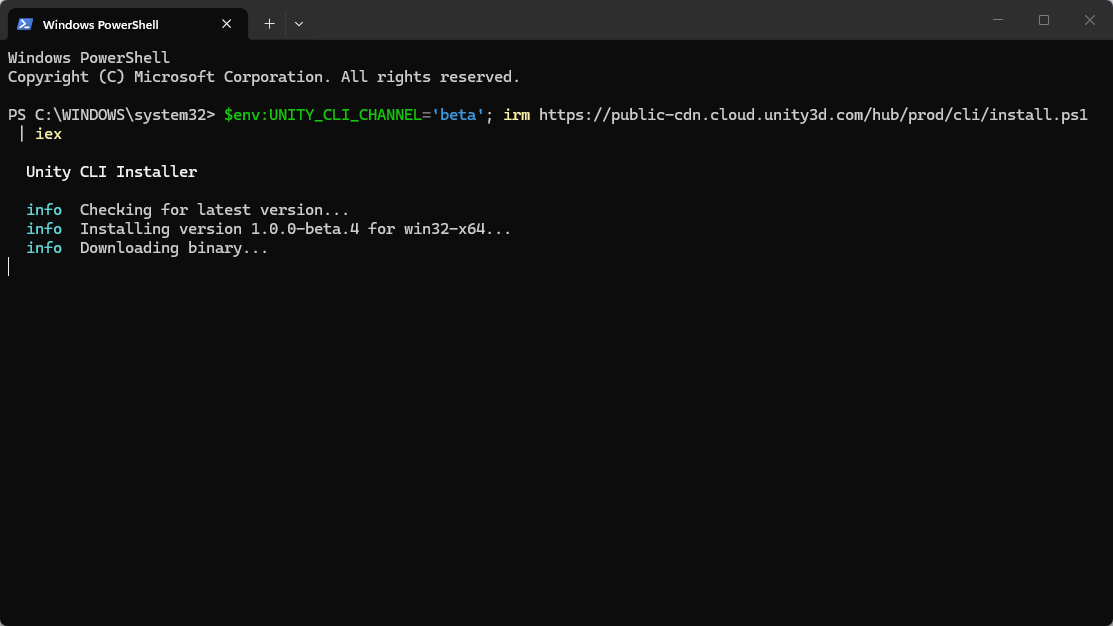
安裝結果如下:
  Unity CLI Installer

  info  Checking for latest version...
  info  Installing version 1.0.0-beta.4 for win32-x64...
  info  Downloading binary...
  info  Verifying checksum...

  ✔  Unity CLI 1.0.0-beta.4 installed!

  Get started:
    unity --help           Show available commands
    unity editors list     List installed Unity editors
    unity install          Install a Unity editor
    unity upgrade          Upgrade to the latest CLI version

  Note: Restart your terminal to use unity.
可以將輸出轉成 json
C:\Users\joker0820>unity editors list --format json
輸出結果:
{
  "success": true,
  "command": "editors",
  "data": [
    {
      "version": "6000.7.0a4",
      "alias": "6.7.0a4",
      "architecture": "x86_64",
      "default": false
    },
    {
      "version": "6000.6.0b7",
      "alias": "6.6.0b7",
      "architecture": "x86_64",
      "default": false
    },
使用管綫輸出方式
D:\OlgCase\RS\HSLR_3>unity editors --format tsv
輸出結果:
Version Alias   Arch    Installed       Default Upgrade to      Platforms
6000.7.0a4      6.7.0a4 x86_64          false
6000.6.0b7      6.6.0b7 x86_64          false
6000.3.21f1     6.3.21f1        x86_64          false
6000.0.81f1     6.0.81f1        x86_64          false
6000.5.8f1      6.5.8f1 x86_64          false
6000.3.15f1     6.3.15f1        x86_64  D:\Program Files\Unity\Hub\Editor\6000.3.15f1\Editor\Unity.exe  false   6000.3.21f1
6000.0.58f2     6.0.58f2        x86_64  D:\Program Files\Unity\Hub\Editor\6000.0.58f2\Editor\Unity.exe  false   6000.0.81f1
6000.0.31f1     6.0.31f1        x86_64  D:\Program Files\Unity\Hub\Editor\6000.0.31f1\Editor\Unity.exe  false   6000.0.81f1     WebGL, Windows
2022.3.54f1             x86_64  D:\Program Files\Unity\Hub\Editor\2022.3.54f1\Editor\Unity.exe  false           Android, Android SDK & NDK Tools, OpenJDK
2021.3.45f2             x86_64  D:\Program Files\Unity\Hub\Editor\2021.3.45f2\Editor\Unity.exe  false
2021.3.45f1             x86_64  D:\Program Files\Unity\Hub\Editor\2021.3.45f1\Editor\Unity.exe  false           WebGL, Windows
2021.3.12f1             x86_64  D:\Program Files\Unity\Hub\Editor\2021.3.12f1\Editor\Unity.exe  false
2020.3.49f1             x86_64  D:\Program Files\Unity\Hub\Editor\2020.3.49f1\Editor\Unity.exe  false
2020.3.47f1             x86_64  D:\Program Files\Unity\Hub\Editor\2020.3.47f1\Editor\Unity.exe  false           WebGL, Windows
2020.3.26f1             x86_64  D:\Program Files\Unity\Hub\Editor\2020.3.26f1\Editor\Unity.exe  false           Universal Windows Platform, WebGL, Windows
2019.4.40f1             x86_64  D:\Program Files\Unity\Hub\Editor\2019.4.40f1\Editor\Unity.exe  false           WebGL, Windows
2018.4.36f1             x86_64  D:\Program Files\Unity\Hub\Editor\2018.4.36f1\Editor\Unity.exe  false           WebGL, Windows
安裝 pipeline
unity pipeline install
安裝結果:
 Pipeline package installation starting...
 Found single Unity Editor instance: unity
 Unity project validated (version: 6000.0.58f2)
 Installing com.unity.pipeline to project: unity
 Resolving latest version of com.unity.pipeline from the Unity registry...
 Latest version: 0.5.0-exp.1
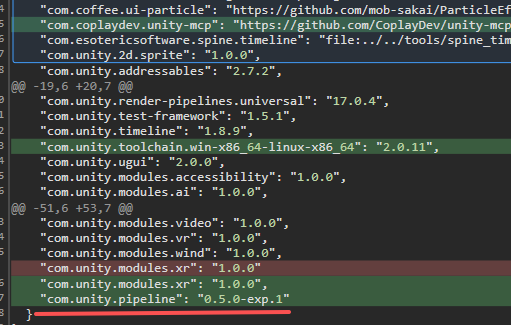
 Added "com.unity.pipeline": "0.5.0-exp.1" to Packages/manifest.json
 Installation complete!
 Unity Editor will resolve the package when the project is opened
可以看到 com.unity.pipeline 被安裝進來了
從 unity --help 可以看到
command|cmd [options] [command] [args...] Execute commands on connected Unity Editor instances, or list available commands輸入查看支持指令
unity command
unity command
 Discovering Unity Editor instance...
 Connecting to Unity Editor at 127.0.0.1:7800

 Connected to Unity Editor (142 commands available)
 Project: D:\OlgCase\RS\HSLR_3\unity
 Server: 0.0.1 (port 7800)

 Available Commands:

    1. add_animator_layer  --controller --name --weight? --blendingMode? --dry_run?
       Add a layer to an AnimatorController.
         --controller: Reference to the AnimatorController to edit (path / guid / globalId). (required) [default: undefined]
         --name: Layer name. (required) [default: undefined]
         --weight: Layer weight (default 1). [default: 1]
         --blendingMode: Blending mode: Override | Additive (default Override). [default: Override]
         --dry_run: If true, validate inputs without writing the layer. [default: false]
    2. add_animator_parameter  --controller --name --type --defaultValue? --dry_run?
       Add a parameter (Float | Int | Bool | Trigger) to an AnimatorController. A duplicate name returns code 'duplicate_parameter'.
         --controller: Reference to the AnimatorController to edit (path / guid / globalId). (required) [default: undefined]
         --name: Parameter name. (required) [default: undefined]
         --type: Parameter type: Float | Int | Bool | Trigger. (required) [default: undefined]
         --defaultValue: Default value for Float/Int/Bool (ignored for Trigger). [default: undefined]
         --dry_run: If true, validate inputs without writing the parameter. [default: false]
Unity CLI 能力總覽
| 模塊 | 支持程度 | 具體能力 | 缺口 |
|---|---|---|---|
| 場景 / GameObject | 完整 | 建立(含批次 create_gameobjects)、刪除、改名、Transform、父子、tag/layer、啟用狀態、多條件查找、階層快照、多場景開關與 active 切換 |
無明顯缺口 |
| 資產管理 | 完整 | 建立 / 複製 / 移動 / 改名 / 刪除 / 匯入外部檔、文字檔讀寫、Unity Search、Import Settings(含平台 override)、authoring root 沙箱 | 資料夾刪除、批次操作需逐一呼叫 |
| Prefab | 完整 | 建立、變體、實例化、apply / revert overrides、unpack、隔離 stage 編輯(nested 安全) | save_prefab_contents 只支援改名 / 設 active 兩種編輯 |
| 元件與序列化 | 完整 | 增刪元件、讀寫序列化欄位、支援陣列索引與 resize、物件引用 handle、enum / Vector / Color / Rect / Bounds | 無 |
| 腳本 / 編譯 | 完整 | 從模板建檔、強制重編、狀態輪詢、按型別或路徑掛載、Roslyn 動態執行、[HotReload] 熱重載 |
無法直接改既有腳本內容(要走 write_text_file) |
| 動畫 (Animator) | 完整 | Controller / Layer / Parameter / State / Transition 全套建構,條件與型別驗證 | ❌ BlendTree 無法建立(只能引用既有的)、無 StateMachineBehaviour、無子狀態機 |
| 動畫 (Clip) | 部分 | 建 clip、讀寫 float 曲線、刪除 binding、loop / frameRate | ❌ 無 object reference 曲線(材質、Sprite 切換)、無事件(AnimationEvent)、tangent 只有手動不支援 Auto |
| Timeline | 部分 | 建 asset、加 track(7 種)、加 clip、讀結構 | 需裝套件;無 binding 綁定、無 marker / signal 詳細設定、無 clip 內部參數 |
| 材質 / Shader | 完整 | 讀寫所有屬性型別、換 shader、render queue、keyword 開關、shader 屬性內省、shader 列表探索 | 無法建立 Shader Graph |
| 光照烘焙 | 完整 | 設定讀寫、非同步烘焙、輪詢、取消、清除(含 disk cache) | ❌ 無 Light Probe / Reflection Probe 佈置 |
| NavMesh | 部分 | Legacy bake 完整(設定 / 烘焙 / 取消 / 清除) | ⚠️ bake_navmesh_surfaces 是 stub;AI Navigation 套件實質不支援;無 Agent / Obstacle / Link 設定 |
| Occlusion Culling | 完整 | 參數化烘焙、輪詢、取消、清除 | 無 |
| 建置 Build | 完整 | 非同步建置、完整 BuildReport、切換 target、scene list 管理、Build Profiles(Unity 6)、target 安裝檢查 | 無簽章 / keystore 設定 |
| 測試 | 完整 | 列出、執行、過濾(name / assembly / category)、同步或非同步、取消 | 無覆蓋率報告 |
| 除錯 / 觀測 | 完整 | Console 增量讀取(cursor 追蹤)、結構化日誌、清除、Editor 狀態、效能統計 | 無 Profiler 深度資料、無 breakpoint |
| 視覺驗證 | 完整 | Scene / Game view 截圖、指定相機、source=screen 可抓 Overlay UI、inline base64 或存檔 |
僅靜態圖,無錄影 |
| 靜態分析 | 完整 | Project Auditor 掃描、分類過濾、CSV 輸出 | — |
| 專案設定 | 完整 | Player / Quality / Physics / Time / Audio / Graphics / Input / Tags & Layers 全部可讀寫 | Input 僅 Legacy,❌ 無 New Input System |
| 套件 UPM | 完整 | 增 / 刪 / 查 / 搜尋 / resolve、支援 registry / git / 本地路徑、同步或非同步 | 無 scoped registry 設定 |
| Editor 控制 | 完整 | play / pause / stop、focus、選取讀寫、任意 menu item 執行、autotick(失焦仍運行) | — |
| UI / UGUI | 幾乎不支援 | 只能 create_gameobject + add_component(Canvas / Image / Button)+ 逐欄位設 RectTransform |
❌ 無 RectTransform anchor / pivot 專用指令、無 EventSystem 自動建立、無 TMP 支援、無 Layout Group 便利操作 |
| Terrain | 不支援 | — | 完全沒有;heightmap / 刷樹 / 材質全缺 |
| Particle System | 不支援 | 僅能 add_component 加上去 |
ParticleSystem 模組是巢狀 struct,序列化欄位路徑極難手動處理 |
| Addressables | 不支援 | — | 無 group / label / build 指令 |
| 版本控制 | 不支援 | — | 無 VCS 整合 |
| Physics 元件 | 部分 | 靠泛用 add_component + 序列化欄位設定 Rigidbody / Collider |
無 Joint 便利建立、無 Mesh Collider 烘焙控制 |
| 逃生口 | eval / eval_file 可跑任意 C#,理論上能呼叫任何 Editor API |
無 Undo 整合、無型別安全、錯誤只能靠 console 撈 |