使用 Qwen2.5B + QLoRA 訓練情緒分類模型:環境檢測與資料集建立
我們將使用 Qwen2.5-1.5B 加上 QLoRA 進行情緒語句的訓練與測試,原本的參數量來説 0.8B 模型就必須 12.8GB vram(全量微調),需要在消費級顯卡上進行測試,那麽就必須將參數量降下來,所以我們將在這裏使用 QLoRA 進行訓練推理,QLoRa 可以將 4bytes 降到 0.5bytes,并且凍結梯度、優化器狀態。
全量微調
| 组成 | 内容 | FP32 參數 |
|---|---|---|
| 模型權重 | x | 4 |
| 梯度 | x | 4 |
| 優化器 | Adam 的 m + v = 2x | 8 |
| 合计 | 4x | 16 bytes/參數 |
所以 0.8B × 16 = 12.8 GB,結果就是消费级顯卡(4080/16GB)連 1.5B 全量微調都做不到。
QLoRa 將權重 4bytes 調整到 0.5bytes,另外凍結梯度、優化器狀態。
所有接下來要訓練的采用 1.5B 模型,根據 Megatron 論文的每一層激活公式(前面計算的是靜態的,後面這是前向傳播時用到的,激活通常存成 FP16)
$$\text{每層} \approx s\cdot b\cdot h \cdot 34 + 5\cdot a\cdot s^2 \cdot b$$
帶入Qwen2.5-1.5B的實際配置(h=1536,L=28,a=12)+ 訓練參數(b=4,s=256,max-seq-len)
$sbh = 256 \cdot 4 \cdot 1536 = 1.57 M$
第一項 $34 \cdot sbh = 53.5M$
注意力項 $5 \cdot a \cdot S^2 \cdot B = 5 \cdot 12 \cdot 256^2 \cdot 4 = 15.7 M$
所以 1.5B 最終合適的就是 4GB vram 卡
每層合計 69.2M
x 28 層 = 1.948
x 2 bytes = 3.9 GB <- 激活值
下面是環境檢查,根據 gpu 條件進行模型判斷
def cmd_check_env(_args):
    try:
        import torch
    except ImportError:
        print("找不到 torch,請先安裝(見 lab.md 準備工作)", file=sys.stderr)
        sys.exit(1)

    if not torch.cuda.is_available():
        print("⚠ 偵測不到 CUDA 顯卡,將只能用 CPU(訓練會非常慢)")
        print("建議:用 Colab Free / Vast.ai 雲端 GPU,或改用 0.5B 模型做推理練習")
        return

    props = torch.cuda.get_device_properties(0)
    vram_gb = props.total_memory / 1e9
    print(f"顯卡:{props.name}, 顯存:{vram_gb:.1f} GB")

    if vram_gb < 4:
        rec = "顯存偏低,建議只跑推理或改用雲端 GPU"
    elif vram_gb < 6:
        rec = "可跑:QLoRA 微調 0.5B / 1.5B(4-bit)"
    elif vram_gb < 12:
        rec = "可跑:QLoRA 微調 1.5B / 3B(4-bit)"
    else:
        rec = "可跑:QLoRA 微調 7B(4-bit),餘裕充足"
    print(f"可跑:{rec}")
這邊開始進行數據生成,需要生成包含情緒用詞語句,這邊采用離綫數據生成,當然也可以用 LLM 進行生成,提供了兩種模式
# 離線種子樣本(不需 API key,用來跑通整條流程)
SEED_SAMPLES = [
    {"text": "今天終於拿到 offer 了!!!", "emotion": "喜悅", "intensity": 5, "trigger": "拿到 offer"},
    {"text": "等了一整年的演唱會明天就要開始,超期待", "emotion": "喜悅", "intensity": 4, "trigger": "演唱會"},
    {"text": "被老闆當眾罵了,真的好想哭", "emotion": "悲傷", "intensity": 4, "trigger": "當眾被罵"},
    {"text": "養了十年的狗走了,家裡空空的", "emotion": "悲傷", "intensity": 5, "trigger": "狗走了"},
    {"text": "他竟然在背後說我壞話,我真的快氣炸了", "emotion": "憤怒", "intensity": 5, "trigger": "背後說壞話"},
    {"text": "排了兩小時隊結果跟我說賣完了", "emotion": "憤怒", "intensity": 3, "trigger": "賣完了"},
    {"text": "半夜聽到客廳有奇怪的腳步聲", "emotion": "恐懼", "intensity": 4, "trigger": "奇怪的腳步聲"},
    {"text": "體檢報告說有個指數異常,要再複檢", "emotion": "恐懼", "intensity": 3, "trigger": "指數異常"},
    {"text": "打開門發現大家躲在裡面幫我慶生", "emotion": "驚訝", "intensity": 4, "trigger": "慶生驚喜"},
    {"text": "沒想到那個一直墊底的隊伍竟然奪冠了", "emotion": "驚訝", "intensity": 4, "trigger": "墊底隊伍奪冠"},
    {"text": "廚餘放了一週,打開蓋子那味道實在受不了", "emotion": "厭惡", "intensity": 4, "trigger": "廚餘味道"},
    {"text": "看到他邊講話邊噴口水真的很噁心", "emotion": "厭惡", "intensity": 3, "trigger": "噴口水"},
]


def _synth_offline(n):
    """離線模式:用種子樣本循環補滿到 n 條(示範流程用)。"""
    out = []
    i = 0
    while len(out) < n:
        out.append(dict(SEED_SAMPLES[i % len(SEED_SAMPLES)]))
        i += 1
    return out[:n]

def _synth_api(n):
    """呼叫 Claude / GPT-4 批量合成。每批要 10 條,直到湊滿 n。"""
    samples = []
    try:
        if os.environ.get("ANTHROPIC_API_KEY"):
            import anthropic
            client = anthropic.Anthropic()
            while len(samples) < n:
                resp = client.messages.create(
                    model="claude-opus-4-8",
                    max_tokens=2048,
                    messages=[{"role": "user", "content": SYNTH_PROMPT}],
                )
                text = resp.content[0].text
                samples.extend(_parse_synth_block(text))
        elif os.environ.get("OPENAI_API_KEY"):
            from openai import OpenAI
            client = OpenAI()
            while len(samples) < n:
                resp = client.chat.completions.create(
                    model="gpt-4o",
                    messages=[{"role": "user", "content": SYNTH_PROMPT}],
                )
                samples.extend(_parse_synth_block(resp.choices[0].message.content))
        else:
            print("未設定 ANTHROPIC_API_KEY / OPENAI_API_KEY,改用 --offline 模式", file=sys.stderr)
            sys.exit(1)
    except Exception as err:
        print(f"合成失敗:{err}", file=sys.stderr)
        sys.exit(1)
    return samples[:n]


def _parse_synth_block(text):
    """從模型回覆中抽出 JSON list(容忍前後多餘文字)。"""
    start = text.find("[")
    end = text.rfind("]")
    if start == -1 or end == -1:
        return []
    try:
        return json.loads(text[start : end + 1])
    except json.JSONDecodeError:
        return []

def cmd_synth(args):
    samples = _synth_offline(args.n) if args.offline else _synth_api(args.n)
    _write_jsonl(args.out, samples)
    print(f"✓ 產出 {len(samples)} 條 → {args.out}")
    dist = Counter(s["emotion"] for s in samples)
    missing = [e for e in EMOTIONS if e not in dist]
    if missing:
        print(f"⚠ 下列情緒未出現:{missing}")
    else:
        print("✓ 6 類情緒均有覆蓋")
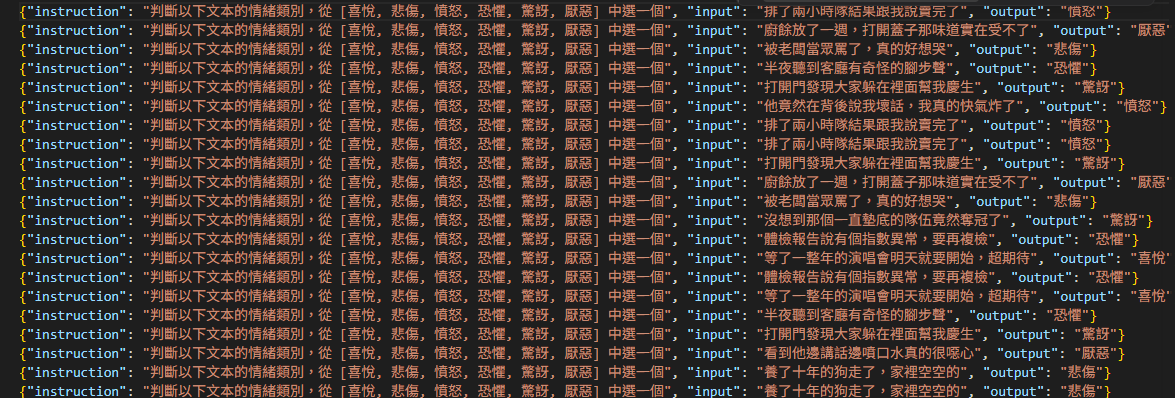
下面這裏是將數據格式轉換成后需要訓練跟測試的格式
def cmd_format(args):
    """原始標注(含 text / emotion)轉 Alpaca 指令格式。"""
    out = []
    for s in _read_jsonl(args.infile):
        out.append({
            "instruction": INSTRUCTION,
            "input": s["text"],
            "output": s["emotion"],
        })
    _write_jsonl(args.out, out)
    print(f"✓ 轉換 {len(out)} 條 → {args.out}")
下面這是看看生成數據是否有缺失
def cmd_validate(args):
    rows = list(_read_jsonl(args.infile))
    print(f"✓ {len(rows)} 條,全部可解析")

    required = {"instruction", "input", "output"}
    bad_fields = [i for i, r in enumerate(rows) if not required.issubset(r)]
    if bad_fields:
        print(f"✗ {len(bad_fields)} 條欄位缺失,例如行 {bad_fields[:3]}")
    else:
        print("✓ 欄位完整(instruction / input / output)")

    bad_labels = [r["output"] for r in rows if r.get("output") not in EMOTIONS]
    if bad_labels:
        print(f"✗ 發現非法標籤:{set(bad_labels)}")
    else:
        print("✓ 標籤全部合法")

    dist = Counter(r["output"] for r in rows)
    print("類別分布:")
    top = max(dist.values()) if dist else 1
    for emo in EMOTIONS:
        cnt = dist.get(emo, 0)
        bar = "█" * max(1, round(cnt / top * 12)) if cnt else ""
        print(f"  {emo} {bar} {cnt}")

    if dist:
        ratio = max(dist.values()) / max(1, min(dist.values()))
        flag = "✓" if ratio < 3 else "⚠"
        print(f"{flag} 最大/最小類別比 {ratio:.1f}(< 3 視為可接受)")
最後是將生成的數據拆分成 訓練/測試 樣本
def cmd_split(args):
    """把 Alpaca 格式資料按情緒分層切成 train / test,避免資料洩漏。"""
    import random

    rows = list(_read_jsonl(args.infile))
    # 依 output(情緒標籤)分組,逐組切分 → 保證 test 各類別都有
    by_label = {}
    for r in rows:
        by_label.setdefault(r.get("output"), []).append(r)

    rng = random.Random(args.seed)
    train, test = [], []
    for group in by_label.values():
        rng.shuffle(group)
        n_test = max(1, round(len(group) * args.test_ratio))
        test.extend(group[:n_test])
        train.extend(group[n_test:])

    rng.shuffle(train)
    rng.shuffle(test)
    _write_jsonl(args.train_out, train)
    _write_jsonl(args.test_out, test)
    print(f"✓ 切分 {len(rows)} 條 → train {len(train)} / test {len(test)}")
    print(f"  train → {args.train_out}")
    print(f"  test  → {args.test_out}")
如果不拆分數據集則訓練后測試的肯定會高度重合,那就失去測試意義
下面是訓練樣本