測試使用 SharpLensMcp:Roslyn 語意分析實戰與 CodeGraph 三層架構整合
安裝 SharpLensMcp
dotnet tool install -g SharpLensMcp
D:\OlgCase\RS\XXXX>dotnet tool install -g SharpLensMcp
工具 'sharplensmcp' 已安裝。
安裝完成后啓動 sharplens
sharplens
D:\OlgCase\RS\XXXX>sharplens
[10:33:08] [Information] SharpLens MCP server starting...
啓動 claude CLI 並嘗試使用 SharpLen

發現找不到對應的 SharpLens 工具
❯ Use SharpLens to load the current C# solution.
I don't have a SharpLens tool available in this session. It isn't among the connected MCP servers or built-in tools.
What is connected for this repo:
codegraph (mcp__codegraph__codegraph_explore) — a pre-built code-intelligence graph over the whole workspace, including all the C# under unity/. It returns verbatim symbol source + call paths + blast radius in one call. For "understand/locate/analyze C#" this covers what SharpLens/Roslyn-style loading would give you.
UnityMCP (still connecting) — drives the Unity Editor.
A couple of options:
If you have a SharpLens MCP server you want to use, it needs to be added to your Claude Code MCP config (e.g. claude mcp add sharplens ... or in .mcp.json / settings). Once it reconnects I can drive it. Tell me how it's installed and I'll help wire it up.
If the goal is just "load and analyze the current C# solution," I can do that now via codegraph — the index is already built for this repo (there's a .codegraph/ dir).
Which do you want — set up the actual SharpLens server, or should I use codegraph to load/analyze the C# solution? And if the latter, what are you trying to find?
出現這個,應該還是要按照 mcp config
這邊發現必須手動加入設定到 mcp.json,如下:
{
  "mcpServers": {
    "UnityMCP": {
      "type": "http",
      "url": "http://127.0.0.1:8088/mcp"
    },
    "sharplens": {
      "type": "stdio",
      "command": "sharplens",
      "args": [],
      "env": {
        "DOTNET_SOLUTION_PATH": "d:\OlgCase\RS\HSLR_3\unity\unity.sln"
      }
    }
  }
}
執行時發現錯誤 [Failed to parse] Project config (shared via .mcp.json),必須將單反斜線 \改成雙反斜線 \:
"DOTNET_SOLUTION_PATH": "d:\\OlgCase\\RS\\HSLR_3\\unity\\unity.sln" 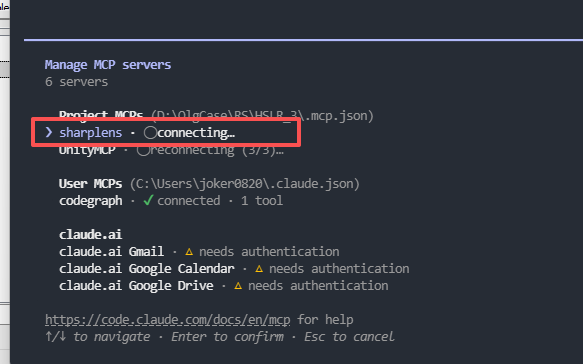
將 SharpLens 改到 unity 項目啓動,再執行 reconnect 終於連上 SharpLens
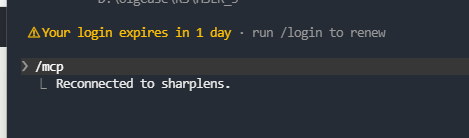
連接上 SharpLen 後我們來測試看看,首先讓 claude code 使用 SharpLens 分析看看
Use SharpLens only.

Check whether the configured C# solution is loaded successfully.
Run the SharpLens project/solution health check and report:
- solution path
- projects loaded
- number of documents
- diagnostics/errors
- whether Roslyn semantic analysis is available

Do not modify any files.
分析得到結果:
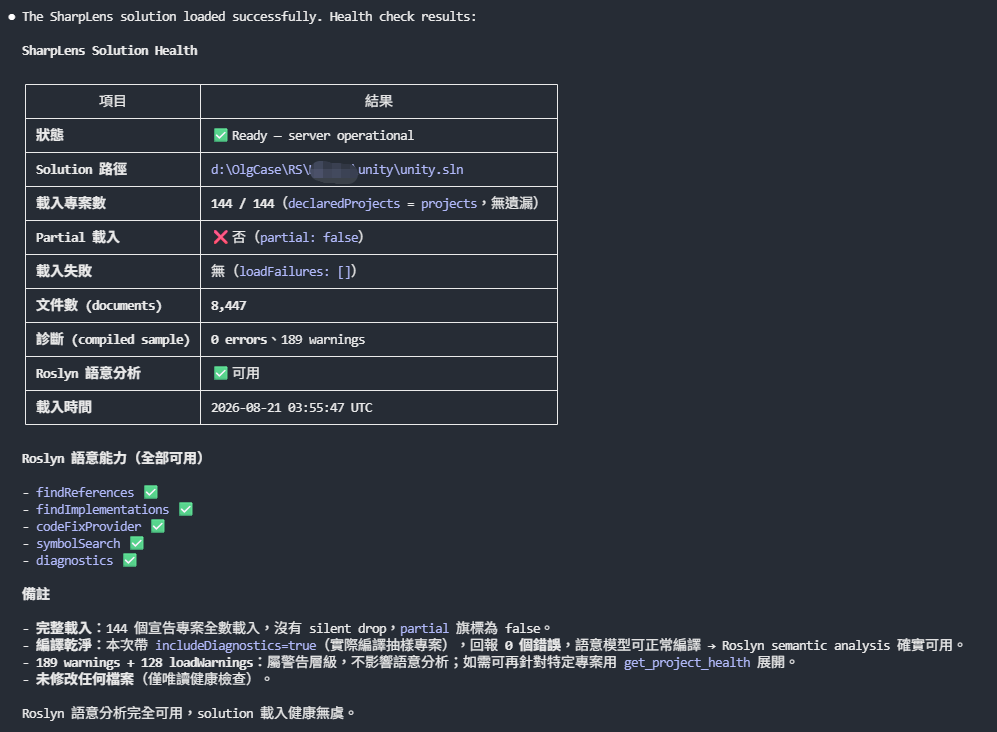
接著我們來測試搜索 Fontmanager 看看
Use SharpLens only.

Search the loaded solution for the C# type Fontmanager .
Show:
1. its namespace
2. source file path
3. base type / interfaces
4. all methods and properties

Do not use CodeGraph.
Do not modify files.
可以看到分析的結果,這邊内容非常多就不全部列出:
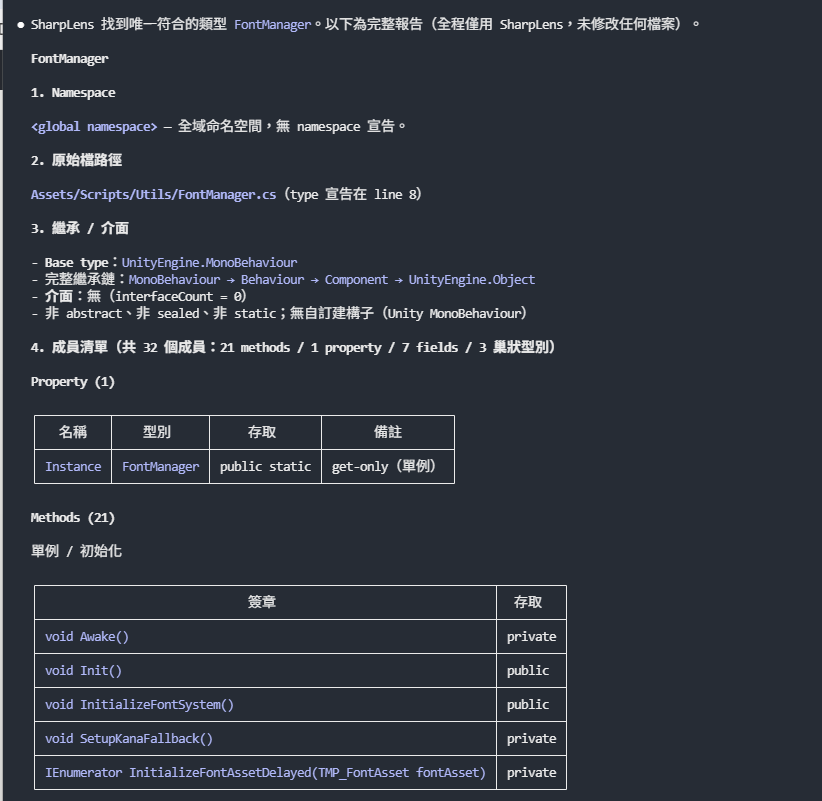
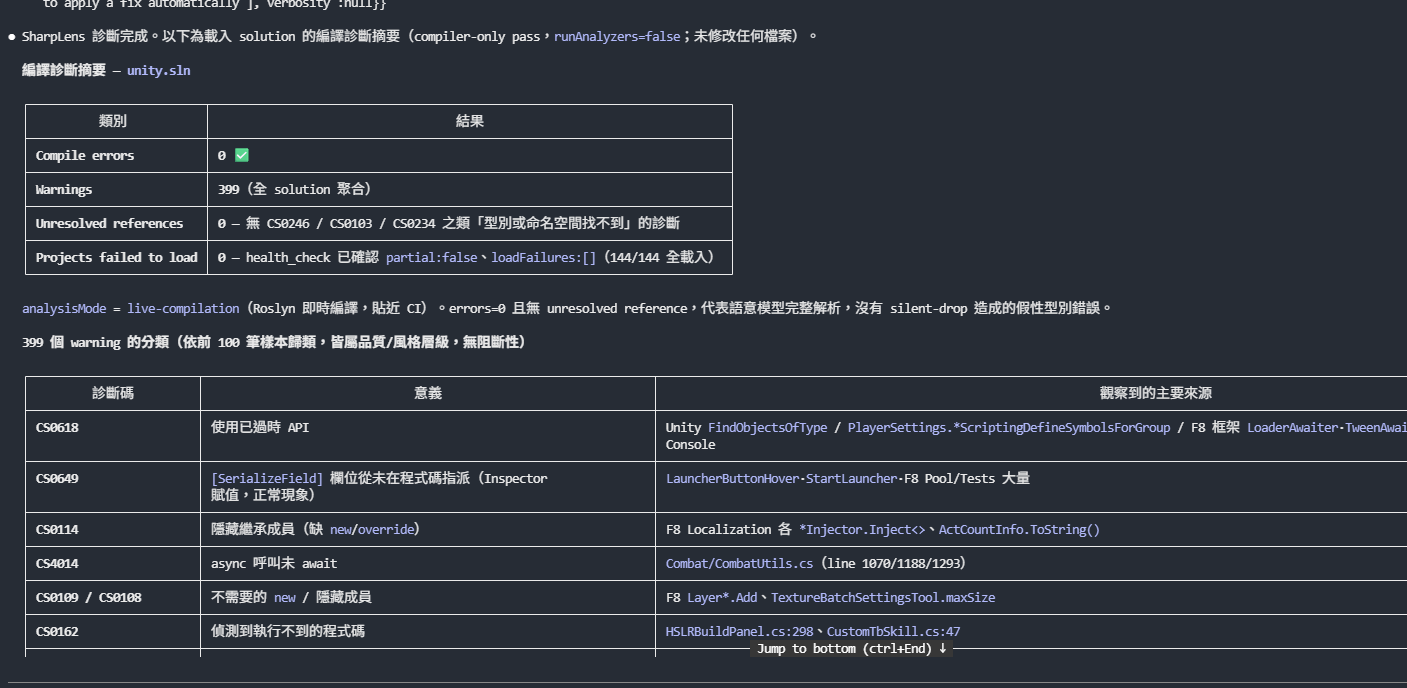
最後進行一個 compile 測試
Use SharpLens only.

Run compiler diagnostics for the loaded solution.

Summarize:
- compile errors
- warnings
- unresolved references
- projects that failed to load

Do not modify any files.
結果如下:
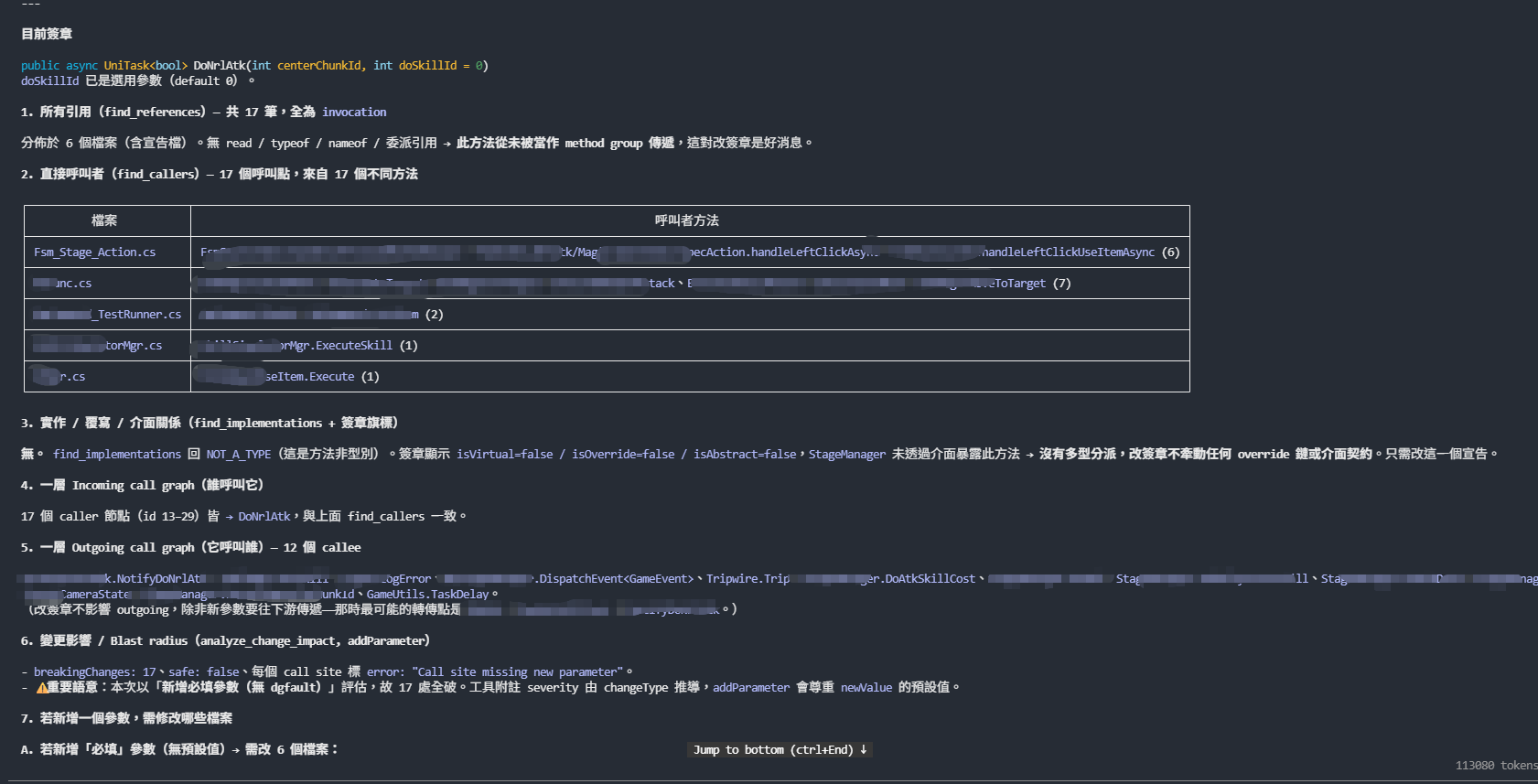
接著我們來測試下常規的需求,修改 NormalAtk 這個函式
Find the method `DoNrlAtk`.

I am considering changing its method signature.

Do not modify any code.

Use SharpLens semantic analysis to determine:

1. All references
2. All direct callers
3. Implementations / overrides / interface relationships
4. One-level incoming call graph
5. One-level outgoing call graph
6. Change impact / blast radius
7. Which files would require modification if I added one parameter

Clearly state which SharpLens tools were used.
分析結果:
分析完成。目標方法:StageManager.DoNrlAtk(int centerChunkId, int doSkillId = 0) → Assets/Scripts/Module/StageManager_Fight.cs:1219,回傳 Cysharp.Threading.Tasks.UniTask<bool>(async)。未修改任何檔案。

使用的 SharpLens 工具

┌─────────────────────────────────────────────────┬──────────────────────────────────────┐
│                      工具                       │                 用途                 │
├─────────────────────────────────────────────────┼──────────────────────────────────────┤
│ search_symbols                                  │ 定位方法                             │
├─────────────────────────────────────────────────┼──────────────────────────────────────┤
│ get_method_signature                            │ 取得目前簽章與參數                   │
├─────────────────────────────────────────────────┼──────────────────────────────────────┤
│ find_references                                 │ (1) 全部引用                         │
├─────────────────────────────────────────────────┼──────────────────────────────────────┤
│ find_callers                                    │ (2) 直接呼叫者                       │
├─────────────────────────────────────────────────┼──────────────────────────────────────┤
│ find_implementations                            │ (3) 實作/覆寫/介面關係               │
├─────────────────────────────────────────────────┼──────────────────────────────────────┤
│ get_call_graph (direction=both, depth=1)        │ (4) 一層 incoming、(5) 一層 outgoing │
├─────────────────────────────────────────────────┼──────────────────────────────────────┤
│ analyze_change_impact (changeType=addParameter) │ (6) blast radius、(7) 需修改的檔案   │
└─────────────────────────────────────────────────┴──────────────────────────────────────┘
跟之前使用 codegraph 區別如下,兩者面相的目的是不一樣的:
核心差異
||CodeGraph|SharpLens MCP|
|---|---|---|
|核心技術|Tree-sitter + Code Graph + Embedding|Microsoft Roslyn|
|語言|約 37 種|C# / .NET 專用|
|主要目的|理解大型 codebase 結構|精確理解 C# 語意|
|是否建立索引|是|主要載入 .sln/.slnx|
|Symbol 搜尋|✅|✅|
|Find References|✅|✅|
|Call Graph|✅ 強|✅ 強|
|Semantic Search|✅ Embedding|❌ 不是重點|
|跨語言|✅|❌|
|Compiler Diagnostics|❌ 不是真正編譯器|✅ Roslyn|
|Type Resolution|Tree-sitter / graph 層級|✅ 編譯器級|
|Control/Data Flow|較有限|✅ Roslyn CFG/DataFlow|
|Refactor|不是核心|✅ 很強|
|Change Impact|Graph 推導|Roslyn semantic analysis|
|Dead Code|Graph 分析|Roslyn semantic/CFG|
|AI Token 節省|很強|強|
|Unity/C# 精準度|不錯|更適合|
CodeGraph 會解析程式碼,把 function、class、import、call chain 等建立成圖,並可用 embedding 做 semantic search;目前 README 表示支援約 37 種語言。
SharpLens 則直接建立在 Microsoft Roslyn 上,目前提供 91 個 MCP tools,包括 compiler diagnostics、data/control flow、change impact、refactoring、API breaking-change analysis 等。
兩者最大的差距其實是「編譯器」
這是 SharpLens 真正的優勢。
例如:
void Move(int x) {}

void Move(float x) {}

void Move(Vector3 x) {}
單純:
搜尋 Move很容易拿到一堆結果。
Roslyn 知道:
Move(10);實際綁定:
Move(int)而:
Move(transform.position);實際是:
Move(Vector3)這就是 semantic model。
Partial class、extension method、generic、override、interface implementation、implicit conversion 等地方,SharpLens 的優勢會越來越大。官方也特別強調 Roslyn semantic analysis 對 overloaded methods、partial classes、inheritance hierarchy 比文字搜尋精準。
但 CodeGraph 有一個 SharpLens 很難取代的優勢:跨語言
假設專案是:
Unity Client
   C#

Backend
   Node.js / TypeScript

AI Service
   Python

Tool
   Rust
CodeGraph可以:
              CodeGraph

 Unity C# ───────────────┐
                         │
 Node TypeScript ────────┼──→ Project Graph
                         │
 Python AI ──────────────┤
                         │
Rust Tool ──────────────┘因為它支援數十種語言。GitHub
SharpLens:
Unity C# ───→ Roslyn ───→ ❤️
TypeScript ─────────────→ ❌
Python ─────────────────→ ❌
Rust ───────────────────→ ❌所以如果目標是整個產品 repo 的架構理解,CodeGraph 更合理。
它們不是完全替代關係:
以現在的 Unity 專案,反而會考慮兩個一起用
                    Codex
                      │
          ┌───────────┴───────────┐
          ↓                       ↓
      CodeGraph               SharpLens
          │                       │
    「專案地圖」               「C# 顯微鏡」
          │                       │
   架構 / 搜尋 / 關係         Roslyn Semantic
   Semantic Search            Compiler
   Call Graph                 Refactor
   跨語言                     Data Flow
   快速定位                   Diagnostics
第一階段用 CodeGraph
「跟 Undo 系統相關的 class、method、call chain 有哪些?」
快速縮小到:
UndoManager
BattleManager
CharacterController
SaveState
RestoreState
然後進第二階段。
第二階段用 SharpLens
「分析
RestoreState()的 callers、outgoing calls、data flow,以及改變CharacterState結構會影響哪些 symbol。」
這時 Roslyn 精確分析。
最後才:
Codex
 ↓
修改 .cs
 ↓
SharpLens validate_code
 ↓
Roslyn diagnostics
 ↓
確認沒有 compiler error
這種組合其實比只裝其中一個更合理。
回到 unity 項目,因爲之前已經使用 codegraph,所以我們可以稍加修改下,升級成三層架構
wiki + codegraph + SharpLens 三層偵察
工單 / Requirement
        │
        ▼
┌─────────────────────────┐
│ ① Wiki:知識面           │
│ /stopic                  │
│                         │
│ 這是什麼功能?           │
│ 屬於什麼模組?           │
│ 過去為什麼這樣設計?     │
└───────────┬─────────────┘
            │ 候選 symbol
            ▼
┌─────────────────────────┐
│ ② CodeGraph:結構面      │
│                         │
│ 系統從哪裡進?           │
│ 呼叫鏈大概怎麼走?       │
│ 涉及哪些檔案/系統?      │
│ blast radius 多大?      │
└───────────┬─────────────┘
            │ 精確 symbol
            ▼
┌─────────────────────────┐
│ ③ SharpLens:語意面      │
│ Roslyn                  │
│                         │
│ 這個 reference 真的是誰?│
│ 哪個 overload?          │
│ 哪些 override/interface?│
│ 改 signature 會炸哪裡?  │
│ compiler 是否接受?      │
└───────────┬─────────────┘
            ▼
       修改 / 驗證
另外由於 codegraph 索引有個備注如下:
CodeGraph 是索引、可能落後最新 commit,所以最後必須回 Read / Grep 真實 .cs 核對。
有 SharpLens 後,可以把這條重新定義如下:
Wiki        = 策展知識,不是權威
CodeGraph   = 結構索引,不一定反映最新 working tree
SharpLens   = 當前 solution 的 Roslyn 語意模型
Source Code = 最終事實
變成:
Wiki
 ↓
CodeGraph
 ↓
SharpLens
 ↓
Source Code