分類 程式設計 下的文章

服務端跑起來發現出現了很多警告, 警告內容是註冊消息 OpCode = 0, 警告如下

消息opcode为0: C2S_BomberGame_QueryFrameMessage

接著從錯誤的地方順著流程查看

List<Type> types = Game.EventSystem.GetTypes(typeof(MessageAttribute));
foreach (Type type in types)
{
    object[] attrs = type.GetCustomAttributes(typeof(MessageAttribute), false);
    if (attrs.Length == 0){
         continue;
    }
    MessageAttribute messageAttribute = attrs[0] as MessageAttribute;
    if (messageAttribute == null){
        continue;
    this.typeMessages.Add(messageAttribute.Opcode, Activator.CreateInstance(type));
    this.opcodeTypes.Add(messageAttribute.Opcode, type);
}

public ushort GetOpcode(Type type)
{
    return this.opcodeTypes.GetKeyByValue(type);
}

發現 opcodeTypes 跑到一半就crash了, 這個框架一直有個致命的問題就是流程上有exception部會跳出提示, 有時候就需要下來下斷點查看....有空真的必須好好看看這個問題怎麼解決

發現 Activator.CreateInstance(type) 執行到 MarketInfo 就掛了, 出現這個錯誤

'Activator.CreateInstance(type)' threw an exception of type 'System.MissingMethodException' object {System.MissingMethodException}

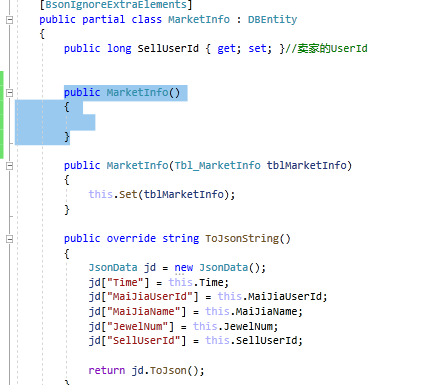
後來查看 MarketInfo.cs 發現了 constructor 沒有寫, 補上去就好了, 就這段

public MarketInfo() { }
56888-xind84hxker.png

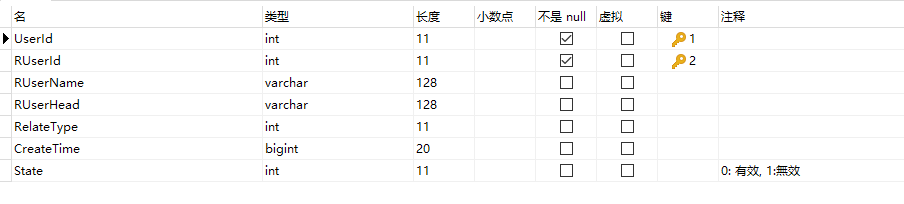
在開發好友系統時, 做了個功能叫做推薦名單, 也就是將最近對戰的玩家記錄到數據表上, 再推給客戶端, 但在獲取數據時發現必須過濾掉已經添加的清單, 索性在表格上添加了一個字段來紀錄是否有效
45883-4ngtcpyj76m.png

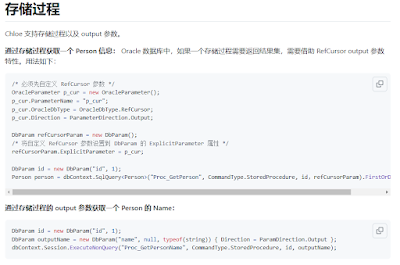
後來發現Chloe處理這段很麻煩, 沒查到官方有 replace 的功能, 所以自己用了 procedure 來處理, 有點久沒用研究了下 Chole 怎麼調用

官方文檔說明
https://github.com/shuxinqin/Chloe/wiki/Oracle-procedure
42712-uac01obubl8.png

兩個寫法不一樣, dbContext.SqlQuery 是直接獲取 Procedure 返回數據的, 就譬如 procedure 最後面寫了 select * from user limit 1; 可以透過這個方式獲取返回的 user 資料, 而 ExecuteNonQuery("Proc_GetPersonName", CommandType.StoredProcedure, id, outputName) 則是透過 Procedure 的 out 獲取數據

我們在更新 recent 表格同時也要獲取 recent 數據, 作法如果

DbParam iUserId = new DbParam("@iUserId", userId);
DbParam iRUserId = new DbParam("@iRUserId", recentUserId);
DbParam iState = new DbParam("@iState", 1);
dbContext.SqlQuery<Tbl_Recent>("proc_update_recent", CommandType.StoredProcedure, iUserId, iRUserId, iState);

這是一個沒有 return 的 procedure 調用方式, Procedure 如下

CREATE DEFINER=`root`@`127.0.0.1` PROCEDURE `proc_update_recent`(
    IN `iUserId` int,
    IN `iRUserId` int, 
    IN `iState` int)
BEGIN
    DECLARE ts long;
    set ts = (UNIX_TIMESTAMP() * 1000) + (MICROSECOND(NOW(3)) / 1000);

    REPLACE into `recent`(`UserId` ,`RUserId`, `State`)
        value
    (iUserId, iRUserId, iState);
END

另外得益於使用 Procedure , 在發送邀請功能上需要判斷很多情況, 如果在 c# 處理邏輯就會很繁瑣, 後來使用 Procedure 解決, 如下

CREATE DEFINER=`root`@`127.0.0.1` PROCEDURE `proc_check_send_friendApply`(
    IN `iApplyUserId` BIGINT,
    IN `iApplyUserName` VARCHAR(64),
    IN `iApplyUserHead` VARCHAR(128),
    IN `iToUserId` BIGINT, OUT `oData` INT)
MAINLOOP:BEGIN

    # declare timestamp
    DECLARE ts BIGINT(20) default 0;
    DECLARE isMyFriend TINYINT(4) default 0;
    DECLARE findRecent TINYINT(4) default 0;
    DECLARE findFriend TINYINT(4) default 0;
    DECLARE findApply TINYINT(4) default 0;


    set ts = (UNIX_TIMESTAMP() * 1000) + (MICROSECOND(NOW(3)) / 1000);

    #已經是我的好友, 退出流程
    select count(*) into isMyFriend from `friend` where `UserId`=iApplyUserId and `FUserId`=iToUserId;
    if isMyFriend != 0 then
        LEAVE MAINLOOP;
    end if;

    #if 如果Recent裡面有數據, 就改掉 state = 1
    select count(*) into findRecent from `recent` where `UserId`=iApplyUserId and `RUserId`=iToUserId;
    if findRecent != 0 then
        REPLACE into `recent`(`UserId` ,`RUserId`,`State`) value (iApplyUserId, iToUserId, 1);
    end IF;

    #if 對方已經是好友就直接加回去, 
    select count(*) into findFriend from `friend` where `UserId`=iToUserId and `FUserId`=iApplyUserId;
    if findFriend != 0 then
        REPLACE into `friend`(`UserId` ,`FUserId`,`CreateTime`, `UpdateTime`) value (iApplyUserId, iToUserId, ts, ts);
        set oData = 2;
        LEAVE MAINLOOP;
    end if;

    #如果沒有邀請過就發邀請
    select count(*) into findApply from `friendapply` where `ApplyUserId`=iApplyUserId and `ToUserId`=iToUserId;
    if findApply = 0 then
        REPLACE into `friendapply`(`ApplyUserId` ,`ApplyUserName`, `ApplyUserHead`, `ToUserId`, `State`, `CreateTime`, `UpdateTime`)
        value
        (iApplyUserId, iApplyUserName, iApplyUserHead, iToUserId, 0, ts, 0);

        select * from `friendapply` where `ApplyUserId`=iApplyUserId and `ToUserId`=iToUserId limit 1;
        set oData = 1;
    end if;
END

很久以前在做第一版的麻將時發現那位服務端非常喜歡用存儲過程, 可能是因為服務端 nodejs 且沒有做數據持久化的緣故, 很多數據無法獲取必須重新拉數據, 這樣就會造成數據庫壓力很大, 最早接手開發RPG遊戲時必然是必須做數據持久化的, 設計到服務端乘載人數跟架構, 不做數據持久化管理壓力會壓在Mysql上, 後來做博奕遊戲就很少做這塊了, 輕便為主

由於電腦轉換了編碼為 utf 發現 vs 打開後不少檔案出現轉換提示, 可能是原本開發時直接在 vs 中新增 .cs 文件的緣故, 因為不透過 unity 新增 .cs 文件估計是參考系統編碼, 所以不少文件編碼都是 ascii 格式, 為了解決這個問題弄了個批量轉換工具, 大致如下吧

需要先安裝 chardet 工具

$ pip install chardet 

代碼如下:

import os
import chardet

root_path = r"g:\OlgCase\bbm\source\Unity\Assets\Hotfix"
count = 0
for path, subdirs, files in os.walk(root_path):
for name in files:
    if not name.endswith('cs'):
        continue
    fn = os.path.join(path, name)

    print(fn)
    f = open(fn, mode='rb')
    content = f.read()
    f.close()
    result = chardet.detect(content)

    if result['encoding'] == None:
        print('error')
        continue

    print(result)
    if (result['encoding'] != 'UTF-8-SIG' and
     result['encoding'] != 'UTF-8' and 
     result['encoding'] != 'utf-8'):

        print('process, encoding:' + result['encoding'] + ", fn:" + fn)
        if result["encoding"] == "GB2312":
            result["encoding"] = "GBK"
        with open(fn, "w", encoding="UTF-8-SIG", newline='\n') as file:
            line = str(content, encoding = "GBK")
            print(line)
            file.write(line)
            count +=1
            file.close()

print("轉換檔案數",count)

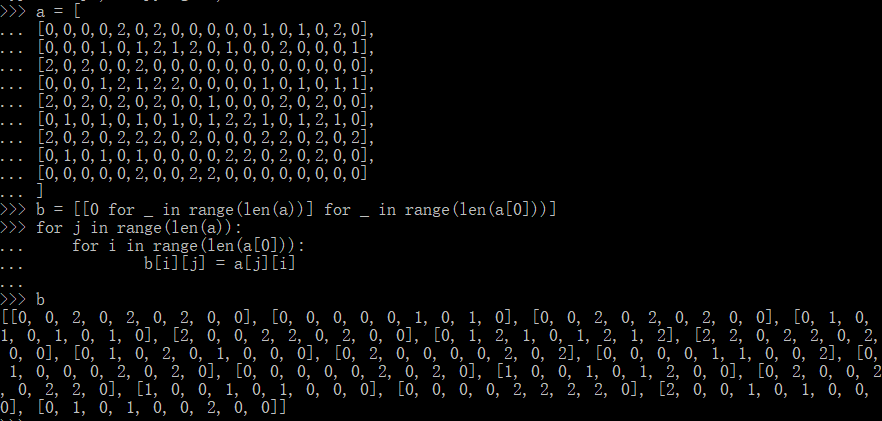
之前為了參考github的轟炸超人AI, 發現source的盤面跟設計的剛好相反,於是用了python做了轉換

原本的盤面數據, 轉換如下

a = [
[0,0,0,0,2,0,2,0,0,0,0,0,1,0,1,0,2,0],
[0,0,0,1,0,1,2,1,2,0,1,0,0,2,0,0,0,1],
[2,0,2,0,0,2,0,0,0,0,0,0,0,0,0,0,0,0],
[0,0,0,1,2,1,2,2,0,0,0,0,1,0,1,0,1,1],
[2,0,2,0,2,0,2,0,0,1,0,0,0,2,0,2,0,0],
[0,1,0,1,0,1,0,1,0,1,2,2,1,0,1,2,1,0],
[2,0,2,0,2,2,2,0,2,0,0,0,2,2,0,2,0,2],
[0,1,0,1,0,1,0,0,0,0,2,2,0,2,0,2,0,0],
[0,0,0,0,0,2,0,0,2,2,0,0,0,0,0,0,0,0]
]

b = [[0 for _ in range(len(a))] for _ in range(len(a[0]))]
for j in range(len(a)):
    for i in range(len(a[0])):
        b[i][j] = a[j][i]

59494-7vx73wa8xbg.png

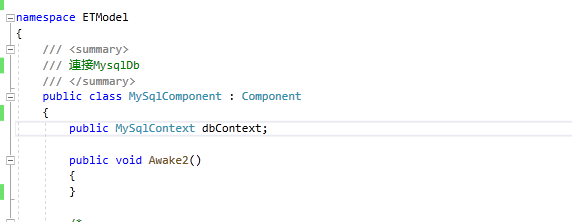
先確定已經安裝 Chloe 組件後將 MySqlContext 加入組件
69059-p5rx6kxlnf.png

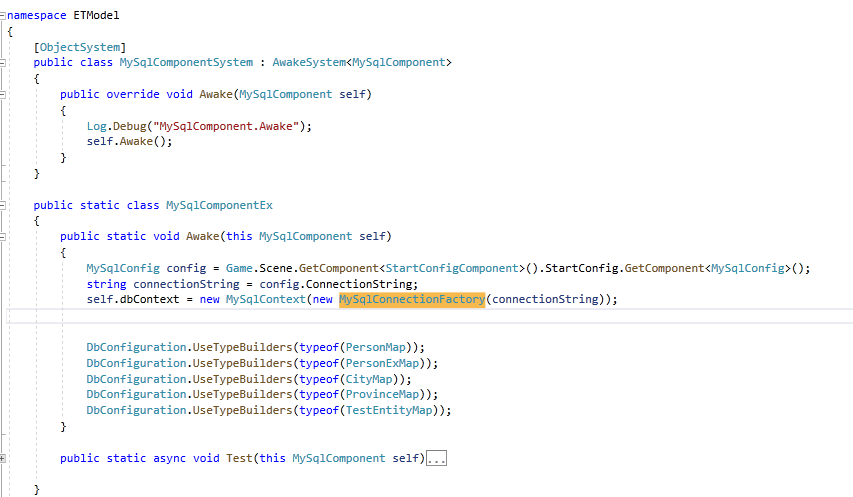
接著在 System 中完成讀取配置跟連接
22270-amvn97ot2re.png

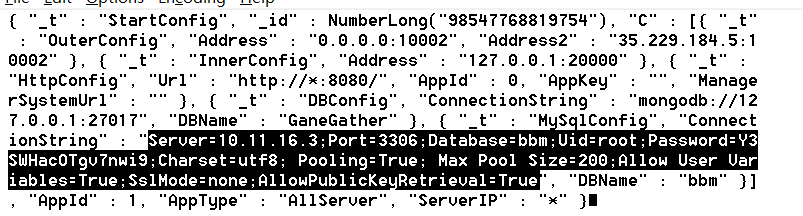
mysql 配置如下
92468-dxzfrkvkz2.png

獲取數據

List<Tbl_UserStageInfo> userStageInfos = mySqlComponent.dbContext.Query<Tbl_UserStageInfo>().Where(item => item.UserId == UserId).ToList();

更新數據

mySqlComponent.dbContext.Update<Tbl_UserStageInfo>(userStageInfo);